Integrating Smart Speakers with Your Legal Streaming Setup
In the modern home, the television is no longer just a screen; it's the centerpiece of a connected entertainment ecosystem. While we invest in high-resolution displays and fast internet for our favorite legal streaming services, one crucial element is often overlooked: audio. Integrating a smart speaker into your setup can dramatically transform your viewing experience, offering not just superior sound but also a new level of convenience through voice control and smart home automation. This guide will walk you through the benefits and the steps to create a seamless and powerful smart speaker streaming setup.
No credit card required • Instant activation
Why Pair a Smart Speaker with Your Streaming Device?
Connecting a smart speaker to your streaming setup goes far beyond simply playing music. It creates a synergy between your devices that enhances every aspect of your content consumption, from audio fidelity to user interaction.
Unlock Superior Audio Quality
The built-in speakers on most televisions are notoriously underwhelming. They often lack the range, clarity, and bass needed to do justice to the cinematic soundscapes of today's movies and series. A dedicated smart speaker, or even better, a stereo pair, can provide a significant audio upgrade. They are engineered for sound, delivering richer dialogue, more impactful effects, and a more immersive soundstage that your TV's speakers simply cannot match.
Embrace Hands-Free Convenience
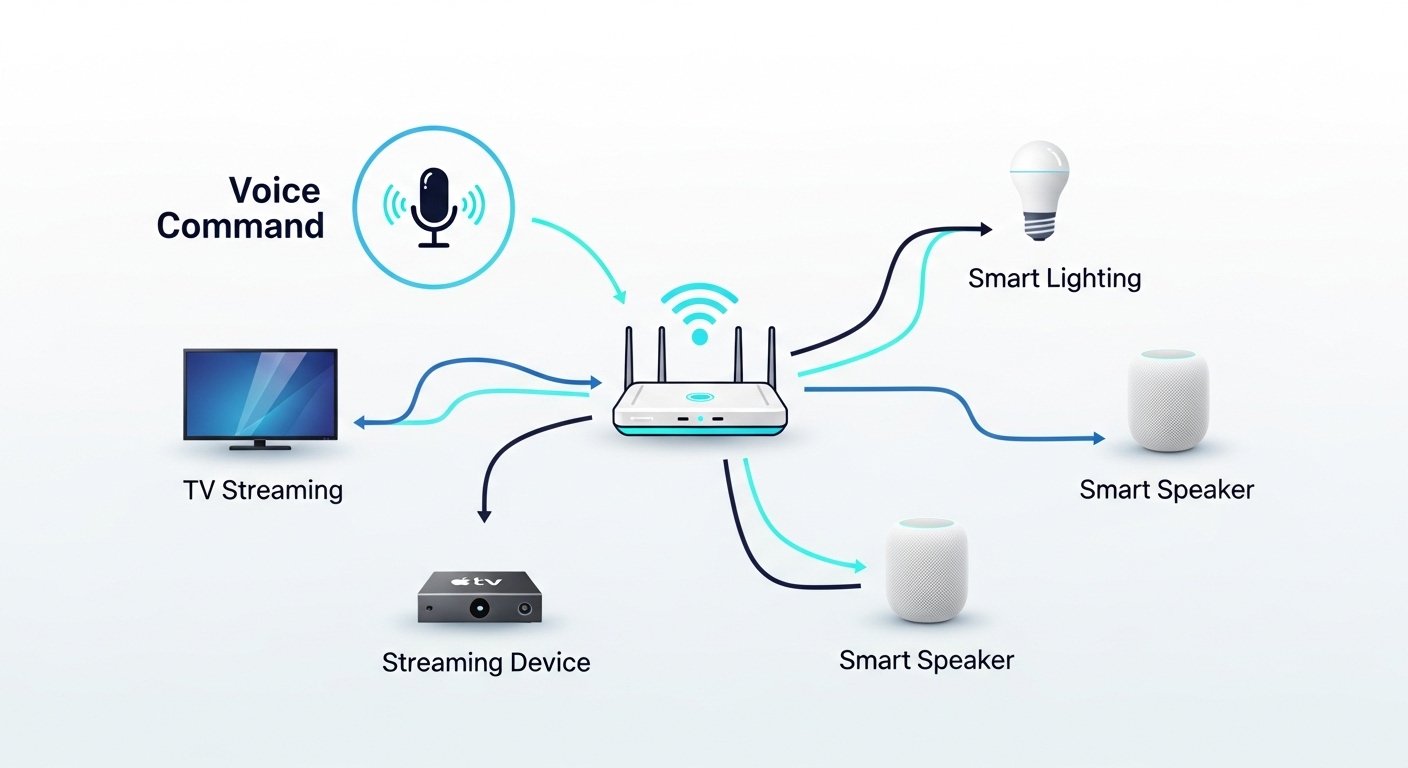
The most immediate benefit is the power of voice control. Instead of fumbling for a remote, you can use simple voice commands to manage your viewing experience. Functions like ‘play', ‘pause', ‘rewind 30 seconds', or ‘turn up the volume' become effortless. You can even search for content across your subscribed legal services, asking your assistant to ‘Play Stranger Things on Netflix' and have it start automatically.
Create an Immersive Smart Environment
A smart speaker often acts as the central hub for your smart home. This allows you to create automated routines that set the perfect mood for movie night. With a single command like ‘Hey Siri, it's movie time', you can have your speaker automatically dim your smart lights, lower your smart blinds, and turn on your TV and streaming device. This level of automation turns a simple viewing session into a true home theater event.
Choosing the Right Smart Speaker for Your Ecosystem
The best smart speaker for you largely depends on the technology ecosystem you already use. For the most seamless integration, it's wise to match your speaker's platform with your primary streaming device.
| Ecosystem | Key Speaker Models | Best Paired With | Key Feature for Streaming |
|---|---|---|---|
| Apple | HomePod, HomePod mini | Apple TV 4K | Can be set as default audio output for all TV audio, creating a seamless ‘Home Theater Audio' experience. |
| Amazon | Echo, Echo Studio, Echo Dot | Fire TV Stick, Fire TV Cube | Deep Alexa integration allows for voice control of both the TV and connected smart home devices. |
| Nest Audio, Nest Mini, Google Home Max | Chromecast with Google TV, Android TV | Google Assistant can search across apps and control playback on Chromecast-enabled devices. | |
| Platform Agnostic | Sonos One, Sonos Beam | Works with most devices | Supports multiple voice assistants (Alexa and Google Assistant) and offers high-fidelity sound. |
For those invested in Apple products, a smart speaker streaming HomePod setup with an Apple TV 4K offers unparalleled ease of use. You can designate a HomePod or a stereo pair of HomePods as the permanent audio output for your Apple TV, meaning all system sounds and content audio are automatically routed through the superior speakers. You can learn more about this specific integration from Apple's official support documentation.
Step-by-Step Guide: A General Smart Speaker Streaming Setup
While specific steps vary by manufacturer, the general process for integrating a smart speaker with your streaming device is quite similar across platforms.
- Initial Device Setup: Unbox your smart speaker, plug it in, and follow the manufacturer's instructions, which typically involve using an app on your smartphone (like Apple Home, Amazon Alexa, or Google Home) to connect the speaker to your Wi-Fi network.
- Position Your Speaker: For optimal sound, place your speaker on a solid surface near your television. Avoid placing it inside a cabinet or too close to a wall, which can muffle the sound. If you're creating a stereo pair, place them on either side of your TV at an equal distance.
- Link to Your Streaming Device: This is the key step. In your device's settings (e.g., on Apple TV) or within the speaker's app (e.g., the Alexa app for a Fire TV), you'll find an option to link the devices. This may involve setting the speaker as the default audio output or simply ensuring both devices are in the same ‘room' in your smart home app.
- Connect Your Streaming Services: To enable voice search, you'll need to link your legal streaming accounts (like Netflix or Disney+) within the speaker's companion app. This authorizes the voice assistant to access your subscriptions and launch content on your behalf. For a seamless setup, ensuring your network is optimized for streaming is crucial. You can explore how to achieve this with our free educational resources and trial.
- Test Voice Commands: Start with simple commands like ‘Pause' or ‘Set volume to 50%'. Then, try more complex searches like, ‘Alexa, find action movies on Hulu' or ‘Hey Google, show me the latest episode of The Mandalorian‘.
No credit card required • Instant activation
Advanced Integrations for the Ultimate Home Theater
Once you've mastered the basics, you can explore more advanced features to further enhance your setup.
Creating Stereo Pairs
Using two identical smart speakers (e.g., two HomePod minis or two Amazon Echo devices) as a stereo pair creates a much wider, more dynamic soundstage. This setup separates audio into left and right channels, providing a sense of directionality and immersion that a single speaker cannot replicate. This is particularly effective for action movies and content with complex sound design.
Building Smart Home Routines
Routines or scenes are the pinnacle of smart home convenience. In the Alexa, Google Home, or Apple Home app, you can create a custom routine triggered by a single phrase. For example, a ‘Focus Mode' routine could turn off your TV, pause your music, and brighten your smart desk lamp, all with one command. Conversely, a ‘Movie Night' routine can prepare your entire room for viewing. You can find guides on setting these up on official pages, such as Google's page on routines.
Troubleshooting Common Smart Speaker Streaming Issues
Even the best setups can encounter hiccups. Here are solutions to common problems:
- Voice Commands Don't Work: Ensure both your speaker and streaming device are on the same Wi-Fi network. Check the companion app to confirm your streaming services are still linked correctly. Sometimes, simply rephrasing the command can work.
- Audio is Out of Sync: This is a common issue with wireless audio. The first step is to restart both your speaker and your streaming device. If the problem persists, check for software updates for all devices. Some platforms, like Apple TV, have a wireless audio sync calibration tool in the settings.
- Device is Unresponsive: A simple power cycle (unplugging and plugging back in) solves a surprising number of issues. Also, check your internet connection, as most smart functions rely on a stable connection to the cloud.
Frequently Asked Questions
1. Can I use a smart speaker from a different brand than my streaming device?
Yes, but functionality may be limited. For example, you can often connect any Bluetooth-enabled speaker to a streaming device for audio output. However, you will likely lose the deep integration for voice control and search that you get when using devices from the same ecosystem.
2. Do I need a smart TV for this to work?
No. The smart speaker primarily interacts with your streaming media player (Apple TV, Fire TV Stick, Chromecast), not the television itself. As long as your TV has an HDMI port for the streaming player, you can benefit from this setup.
3. Is a smart speaker setup secure?
Major manufacturers like Apple, Google, and Amazon invest heavily in security. However, it's crucial to use strong, unique passwords for your accounts and enable two-factor authentication. You can also manage your voice recording history and privacy settings within each respective app. The Federal Trade Commission (FTC) offers guidance on securing smart home devices.
4. Can I control all my streaming apps with my voice?
Support varies. Most major international services like Netflix, Disney+, Hulu, and YouTube have robust voice integration. However, some smaller or region-specific apps may have limited or no voice control capabilities. This functionality is constantly evolving as developers update their apps.
Conclusion: A Smarter Way to Stream
Integrating a smart speaker is more than just a novelty; it's a functional upgrade that enhances the quality and convenience of your legal streaming entertainment. From the rich, immersive audio that brings movies to life to the effortless control of a simple voice command, this technology refines the entire viewing process. Whether you are starting with a single speaker or planning a full smart speaker streaming HomePod setup, you are taking a significant step toward building a more modern, intuitive, and enjoyable home theater.
FusionClubTV publishes educational content about legal streaming, IPTV technology, and device setup. We do not promote piracy, illegal IPTV subscriptions, cracked apps, unauthorized streams, or bypassing paid access.