

No credit card required • Instant activation
In some cases, when using a VLC media player, the channels being used may show a lot of different audio options. Furthermore, in the Nordic channels, there are several language options, giving the viewer the freedom to choose from a number of languages. For example, think about the wide range of languages that can be used.
Tips on how to change the sound channel
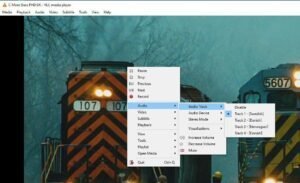
Making a "Right click" in the exact middle of the screen is required to change the audio channel. Following that, go to the "Audio" tab and choose "Audio Track," as shown in the picture above. Here is where you can choose your preferred language, which will make switching between audio channels easier.
If there are any other points you think we should have covered, please let us know in the section below.
No credit card required • Instant activation