How to set up IPTV On rIPTV?
Learn how to set up IPTV on rIPTV in simple steps. Stream your favorite channels effortlessly with this easy guide. Start watching now!

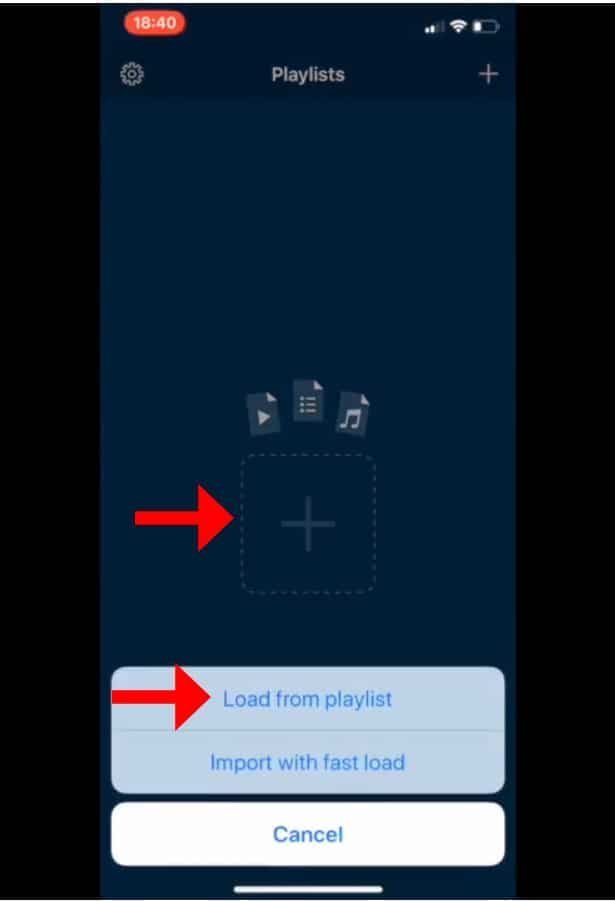
Learn how to set up IPTV on rIPTV in simple steps. Stream your favorite channels effortlessly with this easy guide. Start watching now!

Learn how to setup IPTV on VLC media player in simple steps. Stream your favorite channels effortlessly with this quick guide.

PC users have many free options, including Windows Media Player, QuickTime, Winamp, and VLC.
Install the VLC media player first. At the top of VLC, click “Media,” then “Open Network Stream.” Next, paste your M3U line and wait for channel loading. Select a channel to watch your show after the playlist loads. For your convenience, a detailed guide follows.
Sometimes on a VLC media player, one may encounter a scenario wherein the channels being accessed present many audio options. Specifically, within the Nordic channels, a variety of linguistic alternatives are available, granting the viewer the autonomy to select from an array of languages. Consider, for instance, the diverse linguistic repertoire accessible at one’s disposal.

Learn how to adjust VLC settings to reduce buffering for IPTV. Increase cache size for smoother playback with this simple guide. Watch seamlessly!

One of the best IPTV streaming tools is VLC, known for its versatility and power. From the VideoLAN project, the open-source and free VLC media player serves as a portable, cross-platform media player and streaming server. This exceptional app is compatible with Android, iOS, Tizen, Windows 10 Mobile, and Windows Phone. This guide will explain how to capture live broadcasts with VLC.
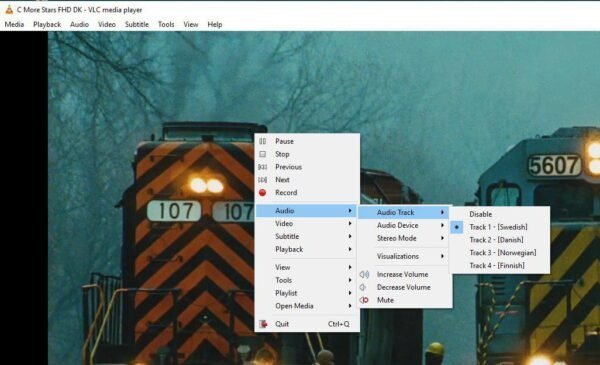
How can I alter the audio on a VLC channel? One may occasionally run into a situation where the channels being accessed on a VLC media player offer a wide variety of audio options. In particular, there are multiple language options available on the Nordic channels, giving the audience the freedom to choose from […]