Behind the Scenes: How World Cup Streaming Technology Works
When you tune in to watch a FIFA World Cup match on your favorite streaming service, it feels like magic. A goal scored thousands of miles away appears on your screen in near real-time, in stunning high definition. But this seamless experience isn't magic—it's the result of a vast, intricate, and powerful technological infrastructure working in perfect harmony. Understanding this process helps you appreciate the value of official streaming services and how to optimize your own setup for the best possible view.
No credit card required • Instant activation
This article pulls back the curtain on the incredible journey a live sports broadcast takes, from the stadium to your smart TV. We'll explore the critical partnerships, the global delivery networks, and the smart protocols that make up modern World Cup streaming technology. By the end, you'll have a clear picture of what it takes to deliver the world's biggest sporting event to millions of fans simultaneously.
From the Pitch to the Production Hub
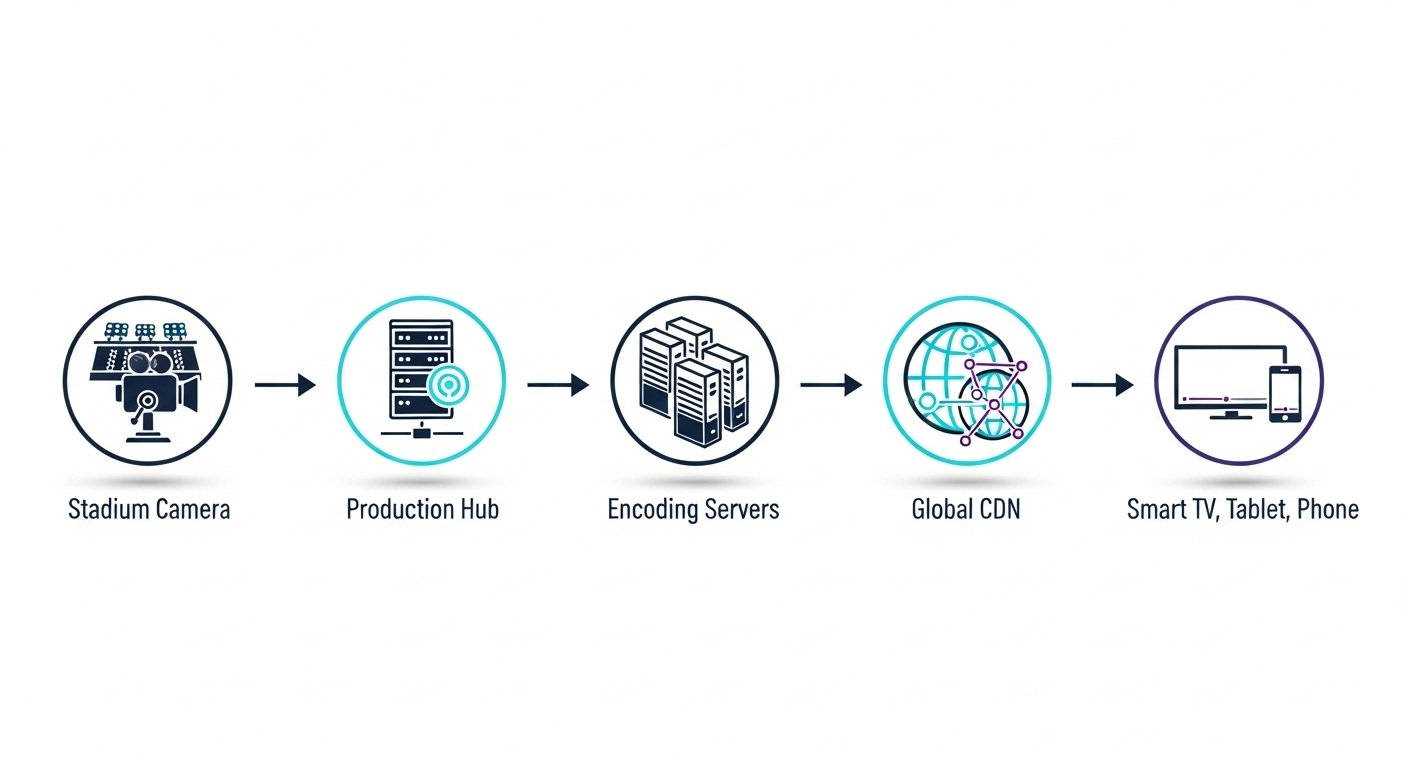
The journey begins right on the field. Dozens of high-dynamic-range (HDR) 4K and 8K cameras capture every angle of the action. Specialized microphones record the roar of the crowd, the thud of the ball, and the referees' whistles. All these raw audio and video feeds are sent to an on-site production truck or a nearby International Broadcast Centre (IBC).
Inside the IBC, a team of directors, producers, and technicians work to create the final broadcast feed. They select the best camera angles, add graphics and instant replays, and mix the audio. This polished ‘world feed' is the master version of the event that is then made available to official rights-holding broadcasters and streaming services around the globe. This initial stage is crucial for setting the quality standard for everything that follows.
The Technical Backbone: Production and Service Providers
Once the world feed is created, it needs to be prepared for internet delivery. This is where specialized technical service providers come in. As seen with major events like the World Cup, official streaming platforms like Germany's MagentaTV partner with production companies to handle the immense technical load. These partners act as the backbone for the entire streaming operation.
Their key responsibilities include:
- Signal Ingestion: Receiving the high-quality broadcast feed from the IBC.
- Encoding and Transcoding: Compressing the massive video file into various formats and bitrates suitable for streaming over the internet. This is a critical step that balances quality with file size.
- Packaging: Wrapping the encoded video and audio into protocols that streaming players understand, such as HLS (HTTP Live Streaming) or DASH (Dynamic Adaptive Streaming over HTTP).
- Redundancy: Creating multiple, redundant signal paths to ensure that if one system fails, another instantly takes over. This is essential for preventing broadcast blackouts during a critical match.
These technical partnerships are the unsung heroes of live streaming, ensuring the signal that leaves the production hub is robust, reliable, and ready for global distribution.
Content Delivery Networks (CDNs): The Global Superhighway
How does a video stream from a single source in North America reach millions of viewers in Europe, Asia, and South America without crippling delays? The answer is a Content Delivery Network, or CDN. A CDN is a geographically distributed network of proxy servers. Instead of every viewer pulling the stream from one central location, the CDN copies the stream to servers all over the world.
When you press play, your device connects to the nearest CDN server, not the original source. This dramatically reduces latency (delay) and the likelihood of buffering. For a global event like the World Cup, CDNs are non-negotiable. They are the superhighways of the internet, designed to handle massive traffic spikes and deliver a consistent, high-quality experience to everyone, everywhere. Major providers like Akamai and Amazon Web Services (AWS) operate vast networks that are essential for the success of large-scale streaming events.
Adaptive Bitrate Streaming: Your Shield Against Buffering
Even with a powerful CDN, the quality of your internet connection can fluctuate. This is where Adaptive Bitrate Streaming (ABS) comes into play. During the transcoding process, the technical provider creates multiple versions of the stream at different quality levels and bitrates (data rates).
Your streaming app or web player constantly monitors your network conditions. If it detects your connection is slowing down, it seamlessly switches to a lower-bitrate stream to prevent buffering. If your connection improves, it switches back up to a higher-quality stream. This is the core piece of World Cup streaming technology that ensures a continuous playback experience, even on less-than-perfect networks. It prioritizes watching the game without interruption over maintaining maximum quality at all times.
| Resolution | Minimum Recommended Bitrate | Common Use Case |
|---|---|---|
| 4K Ultra HD (2160p) | 20-25 Mbps | Large Smart TVs with a fast, stable internet connection. |
| Full HD (1080p) | 5-8 Mbps | Standard for most TVs, laptops, and monitors. |
| HD (720p) | 2.5-4 Mbps | Good for tablets, mobile devices, and slower Wi-Fi. |
| Standard Definition (480p) | 1-2 Mbps | Maintains stream on poor connections or limited mobile data. |
No credit card required • Instant activation
The Final Mile: Your App, Device, and Home Network
The final, and equally important, part of the streaming chain is what happens inside your home. This is ‘the final mile'.
- The Official App: Using the official broadcaster's app (like Peacock in the US or BBC iPlayer in the UK) is crucial. These apps are specifically designed to work with the provider's streaming infrastructure, including their chosen CDNs and ABS protocols.
- Your Device: The processing power of your Smart TV, Fire Stick, or Android TV box matters. Newer devices have better hardware for decoding modern video formats (like HEVC/H.265) more efficiently, resulting in a smoother picture.
- Your Home Network: A stable home network is paramount. For the best experience, a wired Ethernet connection to your streaming device is always recommended over Wi-Fi. If you must use Wi-Fi, ensure your router is modern and placed centrally, away from obstructions. You can check your network performance using tools like the Speedtest by Ookla.
Optimizing these final-mile components can make a huge difference in your viewing experience. If you're new to streaming technology and want to ensure your setup is ready for major events, understanding the basics of legal IPTV technology can be a great starting point. We offer educational resources to help you get the most out of legitimate services, which you can explore with our free trial and setup guides.
Frequently Asked Questions
1. Why does my stream still buffer sometimes?
Buffering can happen for several reasons, even with advanced technology. The most common causes are in the ‘final mile': Wi-Fi congestion in your home, an internet plan that's too slow for the quality you're trying to watch, or an outdated streaming device. It can also occasionally be caused by a local CDN server experiencing unusually high demand.
2. What's the difference between live broadcast TV and live streaming?
The main difference is latency. A traditional over-the-air or cable broadcast has a delay of only a few seconds. A live stream has to go through the entire process of encoding, packaging, and distribution through a CDN, which typically adds a delay of 30-60 seconds. This is why you might see a spoiler on social media before you see the goal on your stream.
3. How can I ensure the best possible streaming quality for the World Cup?
First, ensure you are subscribed to an official rights-holding broadcaster for your region. Use their official app. Second, connect your primary viewing device (like a Smart TV) directly to your router with an Ethernet cable. Third, make sure your internet plan can comfortably handle 4K streaming (25+ Mbps recommended).
4. Is it safe to use free sports streaming websites?
No, it is not safe. These unauthorized sites are illegal and pose significant risks. They are often riddled with malware, phishing scams, and intrusive pop-up ads. The streams are unreliable, low-quality, and frequently cut out. Always stick to official, legal sources for a safe, secure, and high-quality experience.
Conclusion
Delivering a global event like the FIFA World Cup to your screen is a monumental technological achievement. It requires a sophisticated chain of events, from on-site production and specialized technical partners to global CDNs and intelligent adaptive bitrate protocols. Each link in this chain must be robust and reliable. By understanding the complexity of World Cup streaming technology, you can better appreciate the service provided by official broadcasters and take the right steps to ensure your own setup is optimized for the best seat in the house—your own.
Disclaimer: FusionClubTV publishes educational content about legal streaming, IPTV technology, and device setup. We do not promote piracy, illegal IPTV subscriptions, cracked apps, unauthorized streams, or bypassing paid access.